
CZUR Shine Ultra review
Flat paperwork and thinner books in a computer-connected workflow. Here is what the published evidence supports, and what to check.
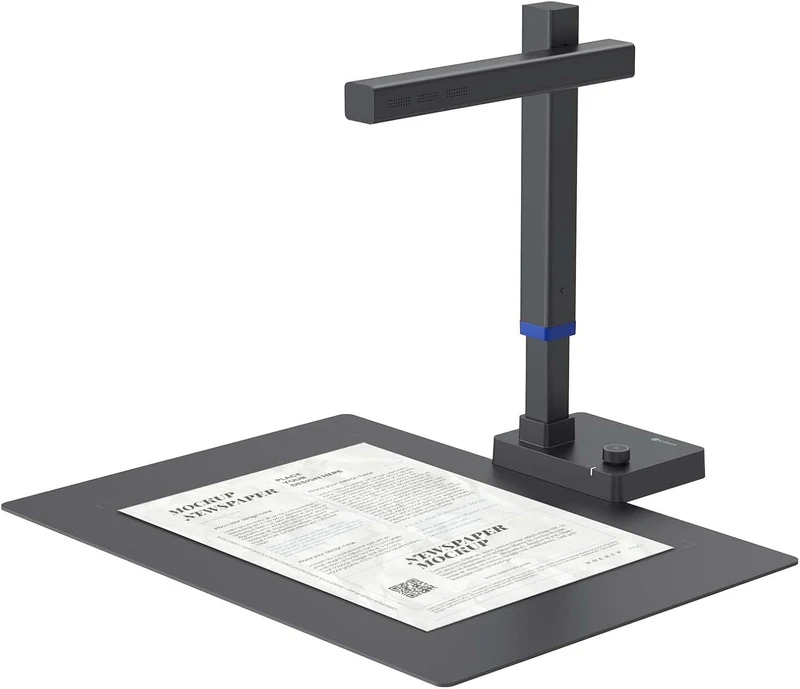
CZUR Shine Ultra
An overhead scanner for everyday paperwork.
Affiliate link · We may earn a commission from qualifying purchases. Disclosure.
View CZUR Shine Ultra on Amazon US ↗ASIN B08NSJQ65L · Check the exact variant and seller.
Keeps bound pages out of a feeder; capture and OCR tools are listed.
Manual page turning; not for glossy photos or mobile-only use.
Image from this Amazon US product listing. Research-based; no hands-on test.
Investigate it for flat pages and thin books.
The Shine Ultra listing emphasizes documents and thinner bound material. It is worth considering when an overhead capture station fits your work, but it is not an automatic page-turner or a promise of archival-quality image reproduction. Start with examples of your own pages and a check of the current software.
This review covers Shine Ultra, not Ultra Pro
The shopping entry below targets Amazon US ASIN B08NSJQ65L, titled “CZUR Shine Ultra Smart Portable Document Scanner, Thin Book Scanner.” The retrieved listing describes a 13MP camera. Shine Ultra Pro is a separately named product; its 24MP claims must not be transferred to this listing.
Variant selection matters. Check the title, ASIN and included accessories again after opening the merchant. We have not measured this scanner or compared it side by side with ET Max.
Published figures and their practical limits
| Item | Published statement | What to check |
|---|---|---|
| Camera | 13MP CMOS; 4160 × 3120 | Legibility at page edges and near a binding, not only pixel count. |
| Capture area | Up to A3 | Your page size, placement and whether the whole spread is in frame. |
| Capture interval | About one second per page is advertised | Page turning, correction, OCR and export add time. This is not a completed-file speed. |
| Processing | Curve flattening, paging, cropping and OCR listed | Inspect a representative output for missing edges, wrong splits and recognition errors. |
| Computer | Windows and macOS; USB connection | Current model download, processor architecture and supported OS version. |
Resolve the software requirements before ordering
The listing is inconsistent about minimum system versions: its older feature bullets and its newer system-support section give different macOS requirements. We do not turn the older text into a compatibility guarantee. Use CZUR's official support entry or ask support for the exact Shine Ultra download for your computer, including Apple Silicon versus Intel where applicable.
The listing says it is not compatible with Android or iOS. Treat this as a computer-connected workflow rather than assuming that a phone can run the scanner. Check OCR support for the actual language and writing system you need; a headline language count does not establish that every script is supported. Do not upload confidential pages to an online tool without first checking how it handles those files.
Where the workflow may fit
Reasons to investigate
- Flat, non-glossy paperwork placed under an overhead camera.
- Thin books that can be opened and positioned without damage.
- A recurring desk task where software cleanup and searchable output are useful.
Reasons to pause
- Thick or tightly bound books: the listing recommends the ET series for thicker material, but that is not proof that any binding is safe to flatten.
- Glossy photographs or color-critical originals: the listing explicitly cautions against this use.
- Large loose-page batches where a feeder design may better fit the task.
- A requirement for mobile-only use or unattended page turning.
Ask for samples, then inspect the finished file
Choose five representative pages: small text, a page near the binding, an illustration, a numbered page and a difficult edge. Ask for the image and searchable export rather than a promotional video alone. Compare readable characters, cropping, page order and the amount of rework. An OCR search that finds one word does not establish accurate recognition throughout the file.
For reflective material, judge the original captured image as well as the software-corrected version. If your main job is photo reproduction, first investigate a suitable photo or flatbed workflow. Our scanner-design guide explains why different materials favor different approaches.
What the sources establish
This is a listing-based research assessment. We have not established a current, model-matched independent testing or owner-comment sample for this exact ASIN in this article. We therefore do not publish a customer score, a reliability percentage or claims that most owners agree about its performance. A manufacturer demonstration and an unverified social video are useful prompts for further checks, not our own testing.
AFFILIATE LINK · AMAZON US · CZURView the Shine Ultra listing.
We participate in CZUR's affiliate program through PartnerBoost. We may earn a commission from qualifying purchases through this marked link.
Listing: CZUR Shine Ultra Smart Portable Document Scanner, Thin Book Scanner
ASIN: B08NSJQ65L. Confirm the full model name, selected variant and included accessories on the listing.
Check the seller, current price, availability, shipping, returns and warranty before ordering. A US listing does not establish delivery or support in other countries. No live price, discount or stock claim is made here.
Questions before you buy
Is this Shine Ultra Pro?
No. This article targets ASIN B08NSJQ65L, the Shine Ultra listing describing a 13MP camera. Check the selected variant before purchase.
Can it scan thick books?
The listing limits its curved-page recommendation to thinner books and points to the ET series for thicker ones. Safe handling and representative samples still matter.
Have you tested its OCR or speed?
No. The figures above are listing statements. Proofread important output and assess the whole workflow.
Next: ET Max research, book-scanning preparation, or organize the originals after capture.
Sources & scope
- Amazon US — CZUR Shine Ultra, ASIN B08NSJQ65L
Listing title, stated 13MP camera, A3 area, material cautions, OCR information and inconsistent OS requirements read October 12, 2026. A commercial listing is not an independent test.
- CZUR support ↗
Official starting point for checking current model downloads. No particular software version was installed or tested by Workwell Lab.
No unlicensed customer images, copied video frames or invented hands-on results are used.