
NELKO PM220 review
Folder, box and document-storage labels after scanning. Here is what the published evidence supports, and what to check.
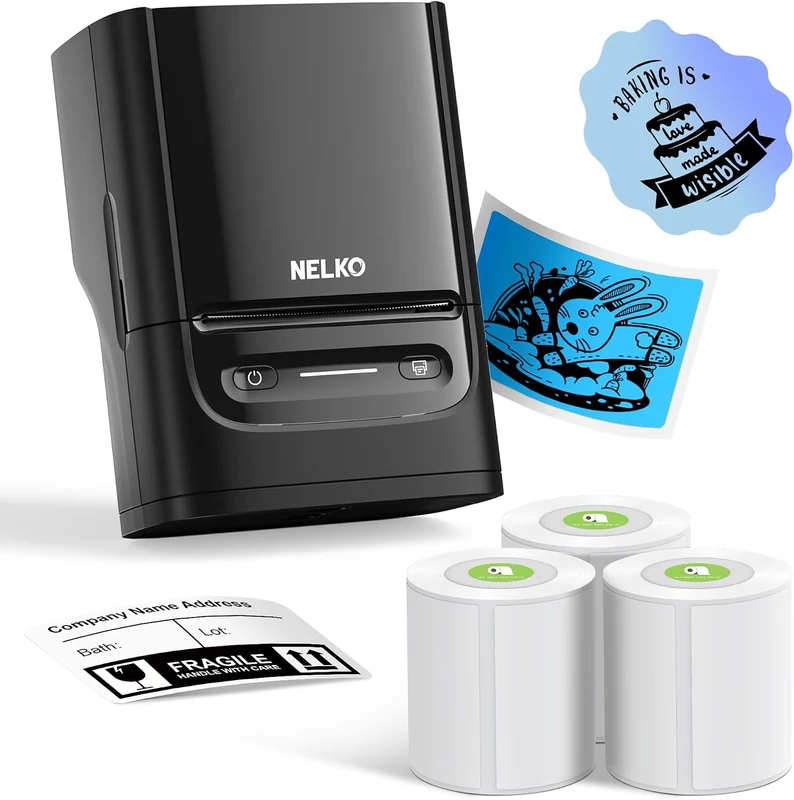
NELKO PM220
Put a clear identifier on the paper files you keep.
Affiliate link · We may earn a commission from qualifying purchases. Disclosure.
View NELKO PM220 on Amazon US ↗ASIN B0D9N86SKQ · Check the exact variant and seller.
Creates consistent folder IDs without buying ink or toner.
Labels are a recurring cost. This device does not scan documents.
Image from this Amazon US product listing. Research-based; no hands-on test.
A labeling tool for the originals you keep.
PM220 is relevant to this site as an accessory for organizing physical folders and boxes after scanning. It does not scan a document, recognize text or back up a PDF. If handwritten folder IDs already work, there is no requirement to buy a printer.
Model details and the linked bundle
The shopping entry targets Amazon US ASIN B0D9N86SKQ, identified as a black PM220 bundle with three tapes. NELKO's general PM220 product page describes the device, but its standard in-the-box section lists one label roll. Do not use that standard box description to promise the contents of the Amazon bundle. Confirm the selected color, label dimensions, roll quantities and seller on the listing.
What NELKO publishes
| Feature | Published information | Before buying |
|---|---|---|
| Printing | Direct thermal; no ink, toner or ribbon | Compatible label rolls are still a recurring cost. |
| Label width | 23–54 mm compatible labels | Check the printable layout, shape and label stock for the actual folder. |
| Connection | Phone via Bluetooth; computer via USB | Do not assume Bluetooth desktop printing. Check current app and driver requirements. |
| Resolution | 203dpi | Check small text and any code on a real printed sample. |
| Software | App editing and Windows/macOS driver entries | Confirm support for your current OS and processor before installing. |
Use one identifier in two places
Give a folder an identifier such as DOC-0001. Put the same identifier in an index and in the name of its related PDF, for example DOC-0001_2026-10-12_manual.pdf. A label on the folder then points to an entry you can find without printing private details on the outside.
Print a small trial batch first. Check text legibility, fit, adhesion on the outer folder and whether the identifier is easy to distinguish from similar IDs. This is an editorial workflow suggestion, not a measured PM220 usability test. See the full paper-file organization guide for a method that also works with a pen and blank labels.
Costs and preservation limits
“Inkless” does not mean cost-free: compare compatible roll cost, labels per roll and wasted labels from a layout change. Buying a machine with one label shape does not establish that the included stock fits every folder tab. Match the roll and layout to the task rather than choosing on the commission rate or a decorative example.
We have not performed heat, sunlight, abrasion, adhesive-removal or long-term aging tests. Do not treat marketing claims about waterproof or fade-resistant labels as archival certification. Label an expendable folder or protective enclosure rather than sticking adhesive directly onto an important original. Keep a separate index so a damaged or faded label does not become your only route to a record.
Check the app and computer workflow
The official PM220 support page lists English manuals and Windows/macOS drivers. We verified those entries, not their installation or behavior on your computer. Obtain software from the official support entry and confirm the OS requirements rather than downloading a similarly named third-party driver.
For names or confidential file references, use a minimal identifier in the label design. Before using app features that send content to a remote service, check the current app's permissions, processing and privacy notice. Workwell Lab does not receive your labels or uploaded documents.
What we have and have not verified
Manufacturer-hosted PM220 comments include favorable reports about portability and label editing. Their ownership, use conditions and selection process have not been independently verified by us; those comments do not establish a failure rate or guarantee easy setup. We do not reproduce usernames, testimonial images or the store's aggregate star rating as our score.
This review currently relies on identified model-specific manufacturer information and the linked bundle identity. It is not a comparative lab test, a long-term ownership report or a recommendation for every labeling task.
AFFILIATE LINK · AMAZON US · NELKOView the PM220 listing.
We participate in NELKO's affiliate program through PartnerBoost. We may earn a commission from qualifying purchases through this marked link.
Listing: Nelko Label Maker Machine with 3 Tapes, PM220 Bluetooth Label Printer, Black
ASIN: B0D9N86SKQ. Black, three-tape bundle. Confirm the included label dimensions and quantities on the listing.
Check the seller, current price, availability, shipping, returns and warranty before ordering. A US listing does not establish delivery or support in other countries. No live price, discount or stock claim is made here.
Questions before you buy
Will PM220 scan my documents?
No. It prints labels. Scanning and OCR need a separate capture and software workflow.
Is the three-roll bundle the same as the standard box?
Do not assume so. Check the linked ASIN's selected variant and current included items.
Do I need a printer to organize scanned records?
No. A pen, folder IDs and a maintained index are a workable starting point.
Are these permanent archival labels?
We have not verified that. Keep an independent index and avoid applying adhesive to valuable originals.
Sources & scope
- NELKO PM220 product page
Manufacturer specifications, standard package description and selected store-hosted comments read October 12, 2026. Commercial claims are not our test findings.
- NELKO PM220 support ↗
Manual and Windows/macOS driver entries read October 12, 2026; no software installation or compatibility test performed.
- Amazon US — linked PM220 bundle
Bundle-specific purchase entry. Verify the current title, seller, stock and included label sizes on Amazon before ordering.